
Distributed software can have many pieces. Let’s say you have a company built around a relatively simple app with some accounts, data management, and reporting capabilities. Your list of components might look like this:
- API
- Database
- Monitoring
- Alerting
- Reporting
- Notifications
- Mobile Client App
- Load Balancer
Let’s pretend you have this app and it’s starting to gain some popularity. You’ve hired expert teams for each of these components to keep them running. Each team is working diligently to add requested features and fix bugs in their component. Each team uses impact metrics to figure out which things they should work on first. Each team decides to live with some bugs that appear to affect only a small percentage of users so they can focus high-impact, flashier features.
What happens to the overall quality in this scenario?
Consider that the effective quality from the user perspective cannot be understood by analyzing only a single component. For example, the mobile client might be bug free, but if the API has a 10% failure rate then the app still fails to do what the user wants 10% of the time. The user’s experience of the app quality is therefore 90%.
If your load balancer also only works 90% of the time, then your user’s experience of app quality would be 90% of 90%, or 81%. It’s clear then that the effective quality of any system is a function of the quality of its parts. Naively you can just calculate the product of the reliability rate of each component and you’ll have a pretty good sense of how reliable the whole service is.
I put together a little spreadsheet to show what happens to effective reliability at different reliability rates for the components:
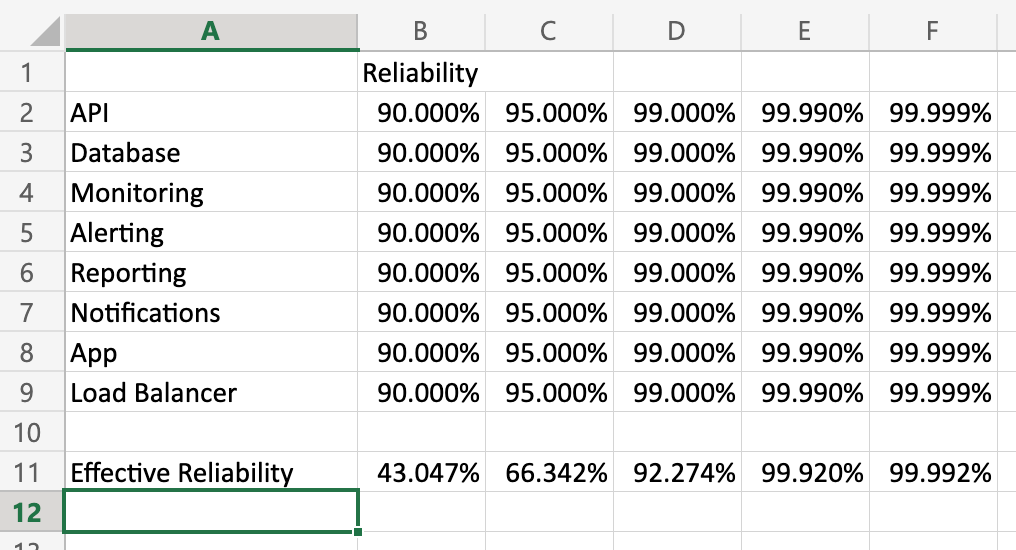
(Feel free to download this workbook and play with the numbers to see how they impact reliability.)
I learned from a colleague that Motorola figured this out in the 80’s. They learned that in order for their products to meet their reliability standards, the reliability of their parts had to meet the quality bar to the sixth standard deviation. They accordingly called this approach to quality Six Sigma.
Aside: “Six Sigma,” like “Agile,” “Devops,” and myriad other terms suffers from the fad phenomenon of businesses slapping labels on what they’re already doing and claiming progress. Later they claim that the thing they didn’t actually try failed. If you’ve been a part of one of these efforts, don’t throw the baby out with the bathwater.
When I started playing with these numbers a couple of things became apparent to me:
- Seeming small shifts in quality at a component level can have an outsize impact on effective reliability.
- The more components you have, the more susceptible the system is to failure modes. This has important ramifications for the cost/benefit analysis for architectures like micro-services.
Is My Organizational Structure Wrong?
Yes, but only because all organizational structures are wrong for some of your organization’s purposes  . Organizational structure can be an impediment to delivering a good service if the priorities of participating teams are not aligned, but it doesn’t have to be.
In the above example each team risks becoming silo’d around their component. It is the job of management to keep all the team’s focus on the quality of the service or capability that these assets exist for. If teams start invoking the law of diminishing returns with respect to fixing defects or the 80/20 rule with respect to quality issues in the service before reaching 4 or 5 9’s of reliability, they are probably not thinking about the needs of the service anymore.
Ideally, it would be one team responsible for delivering the capability. But as the the org and complexity of the service grows, this may no longer be feasible. In these scenarios management should drive the right prioritization of work by getting reliability metrics per component and publicizing how they impact the service you’re trying to deliver. This would help keep team’s eyes focused on the goal–delivering the service–instead of just their local metric.
This is a complaint I’ve heard often in my career. The project starts out fast and somewhere along the way it seems to take forever to get anything done. Sometimes the slow-down can be extreme. In one case it took over a year to deliver changes to some email templates. Often the actual time taken to do a piece of work far exceeds the initial estimate. Why does this happen? Is it because your engineers are fundamentally lazy? Are you being lied to? Is it something else?
To understand one way this deceleration happens, let’s start with a simple question:
How long does it take to make a peanut butter & jelly sandwich?

When I ask this question in presentations, the audience thinks I’m trying to trick them. “Do I have to bake the bread first? Harvest the peanuts?” It’s not a trick question. Seriously, how long does it take? My completely unscientific guess based on years of making PB&J’s is “about 5 minutes.” Most people are good with an answer in that range so it’s not worth arguing about. If your answer is 2 minutes or 10, it won’t change the point of this post.
So, now we’ve spent 5 minutes making a PB&J and another 5 or 10 enjoying the delicious flavors. Nom. Are we done? If this were a software project, the answer would be “yes” and we’d move on to preparing for the next meal. In our life we realize we need to put away the bread, peanut butter, and jelly. We need to wash our dishes and put them away. If the dishwasher is full we run it. If it’s clean we empty it. All of that takes extra time, but that’s the stuff we often don’t do in software engineering. The next meal is just more important.
This leaves our workspace messy.

Let’s refine the question: How long does it take to make a peanut butter & jelly sandwich in this kitchen? Obviously it will take longer. You’ll either have to spend time cleaning up first or scooching stuff out of the way so you can work. It gets harder to estimate how long the effort will take. You’ll run the risk of contaminating your sandwich with olive oil or spices you didn’t intend which means you may have to start over halfway through the effort.
Now, imagine you defer this cleanup work to the hypothetical “later” as part of your standard operating procedure on your team. Then you end up in this kitchen:

How long would it take you to make a PB&J in this workspace? Imagine you’re not in the room–you’re just asking for a PB&J and the person making for you disappears for a long period of time. It would be exasperating. “What’s taking so long?” It would be worse because you would remember other ties where it only took 5 minutes. Perhaps you’re the manager that bought the double-oven, the cooking island, paid for the installation of all the cabinetry, and installed the large refrigerator. The team has the best tools and they can’t deliver!
At this point in a project engineers will start calling for rewrites. This is usually a mistake. The existing mess doesn’t go away while you’re building a new kitchen. Further, if you don’t change your engineering practices, your new kitchen will end up in the same condition in short order.
Let’s look at a clean workspace?

This is a much smaller kitchen with far fewer amenities than the previous one, bit it’s clean and organized. That takes time and effort but it makes everything else you do in this space faster.
Who’s to Blame?
All of us. Engineers often don’t want to do the cleanup and organizational work because it’s boring. Managers & PM’s don’t want engineers to spend time on it because they’re focused on delivering the next feature. But here’s the thing: code is an asset, but it’s also a liability. It helps you solve problems, but every line of code written creates new ones even if there are no bugs. Every line of code written has to be maintained in perpetuity. This process cannot be cheated. Essentially, we must clean our workspace every time we use it.
What Can We Do?
To Managers: you get what you incentivize for. Learn to see heroic fixes as failures. “Why were heroic efforts required in this case? How can we obviate the need for heroics?” Recognize and reward teams and individuals who work smoothly.
To PM’s: Make the health of your system a top-line metric. Maintain the health of your system before adding new features.
To Engineers: This may sound harsh, but do your job. This is your workspace. You’re the one living with these decisions on a day-to-day basis. Stop treating a cluttered kitchen as normal and learn communicate the importance of all of the work. Stop asking for permission to keep your workspace clean and just include that effort in your estimates! Learn to write effective automated tests–don’t just give up because it’s harder than it looks. Prioritize clean, communicative code over “clever” code. Think about failure modes and design for them.
Before we get directly into Total Cost of Ownership questions, I’d like to give a little background on how I approach this topic. I’m a student of the Theory of Constraints. I’m no expert, but I have a working knowledge of the concepts and how to apply them in Software.
Theory of Constraints (ToC)
The Theory of Constraints is a deep topic. If you’re not familiar with it, I encourage you to read “The Goal,” “The Phoenix Project,” and “The Unicorn Project” as primers. These are all fiction novels that do a fantastic job bringing abstract ideas into concrete reality in a way that’s easy to grasp.
The aspect of the ToC I want to focus on now is the attitude toward inventory and operating expense. When you invest in inventory, you are committing funds that are “frozen” until the end-product is sold. Inventory and Operating Expense detract from the realization of value, i.e., profit. Many managers focus their effort on reducing inventory and operating expense as a way to increase profit. There’s no intrinsic problem with this approach, but it does have some limitations.
First, you need some inventory and some operating expense in order to produce value. This means that the theoretical limit to how much you can reduce inventory and operating expense approaches but can never reach zero. At some point, you will have done all you can.
In ToC, while you are encouraged to reduce inventory an operating expense where it makes sense, this is less important than increasing throughput. If you can produce more quality product faster but incur some minor increase in inventory and operating expense, it’s worth it to do it. ToC’ers are careful to remind you though that local optimizations (e.g, optimizing just one step in the production process) are irrelevant. What matters more is that you can move value through the entire value stream and realize the value as quickly as possible.
ToC in Software
In software engineering, inventory is your backlog. The realization of value is when the software is used. Everything in between is operating expense. The golden metric in software engineering is lead time–the time it takes to deliver a feature from the moment it’s started.
Aside: I have found it helpful to track the delivery time from the moment it's requested (ordered) as well as the time from the moment an engineer starts working on the story. This helps separate engineering bottlenecks from project management bottlenecks.
The activity of software engineering is aimed at delivering value through features. Repairing defects does not add value. They are work that has already been paid for so the repair effort is a net loss to feature delivery. They consume valuable resources (developer time) without adding new value (features).
Three Approaches to Functional Quality
In software delivery, the biggest bottleneck is usually in the testing phase. As it stands, it’s also the phase that most often gets cut. The result is low-quality systems.
In software construction, there are only three approaches to functional quality.
- Production “Testing”. Unfortunately, I’ve worked for some companies that do this. They have no QA and no internal quality gates or metrics. They throw their stuff out there and let the users find the bugs. Even some “Agile” shops do this since it’s easier to teach people how to move post-it notes across whiteboards than it is to teach them how to engineer well.
- Manual Testing. This is much more common. In the worst case, developers write code and pass it through “works on my machine” certification. In the best case companies hire Testers who are integrated with the team. The testers have written test cases that they traverse for each release.
- Automated Testing. This approach is much less common than I would like. In this model, developers write testing programs along with the code they are developing. These tests are run every time changes are committed to check for regressions. The defects slip through, the fixes are captured with additional automated tests so that they don’t recur.
If you are testing in production, you don’t care about quality. Your users will likely care and you are not likely to keep them. Almost everyone understands that this is not an ideal way to proceed. Most people rely on manual testing. Some have some supplemental automated testing. Few have fully reliable automated test suites.
Manual Testing
Many companies rely mostly on manual testing. In a purist’s world, all test cases are executed for every release. Since manual testing–even for small systems–is necessarily time-consuming, most companies do some version of targeted manual testing–targeting the feature that had changes. Of course, defects still slip through, often in the places that weren’t tested because the test cases weren’t considered relevant to the change. What I want to bring your attention to here is not the impact on quality but on lead time.
In this model, when the dev work is done (it’s “dev-complete”), it gets handed off to some QA personnel for manual testing. This person may or may not be on the same team, but it’s irrelevant for our purposes. This person has to get a test environment, setup the software, and march through their manual test cases. This cannot be done in seconds or minutes. In the best case scenario, it takes hours. In reality, it’s usually days. If failures are found the work is sent back to engineering and then process is repeated.
Due to the need to occasionally deploy emergency fixes, there has to be some defined alternative approach to getting changes out that is faster and has less quality gates. Many companies require management and/or compliance approval to use these non-standard processes. Hotfixes themselves have been known to cause outages due to unforeseen consequences of the change that would normally be captured by QA.
Automated Testing, Continuous Integration, and Continuous Deployment
In contrast to the manual testing approach, automated testing facilitates rapid deployment. The majority of use-cases are covered by test programs that run on every change. The goal is to define the testing pipeline in such a way that passing it is a good enough indicator of quality that the release should not be held up.
In this model, branches are short-lived and made ready to release as quickly as possible. The test cases are executed by a machine which takes orders of magnitude less time than a human being. Once the changes have passed the automated quality gates, they are immediately deployed to production, realizing the value for the business.
When done well, this process takes minutes. Even with human approval requirements, I’ve had lead times of less than an hour to get changes released to production.
The capabilities that these processes enable are enormous. Lead times go way down which means higher feature throughput for our engineering teams. We are able to respond to production events more quickly which increases agility not only for our engineering teams but also for our businesses. We have fewer defects which means even more time to dedicate to features.
DevOps
Many engineers think of DevOps as automating deployments. That’s certainly part of it, but not all. DevOps is about integrating your ops and dev teams along the vertical slices. Software construction should be heavily influenced by operational concerns. If the software is not running, then we are not realizing value from it. Again, the ToC mindset is helpful here.
Software construction should include proper attention to logging, telemetry, architecture, security, resiliency, and tracing. Automating the deployments allows for quickly fine-tuning these concerns based on the team’s experience running the service in production.
Deployment automation is a good first step and helps with feature-delivery lead times right away. Let’s think about some other common sources of production service failure:
- Running out of disk space.
- Passwords changed.
- Network difficulties.
- Overloaded CPU.
- Memory overload.
- Etc…
A good DevOps/SRE solution would monitor for these (and other) situations and alert engineers before they take down the service. In the worst case, they would contain detailed information about the problem and what to do to address it. This reduces downtime for the service and allows you to restore service faster in the case of an outage. From a ToC perspective, both outcomes increase the time you are realizing value from the software.
So Why Are Modern Engineering Practices Still Relatively Rare in our Industry?
I’ve been trying to answer this question for 17 years. I think I finally have a handle on it.
Remember that it’s common to attempt to increase profit by reducing operating expense. Automated testing and deployment requires a fair amount of expertise and a not-small amount of time to setup and do well. They are not often regarded as “features” even though the capability of rapid, confident change certainly is. These efforts begin as a significant increase in operating expense, especially if it’s being introduced into a brown-field project for the first time.
Aside: It can be hard to convince managers that we should spend time cleaning up technical debt. It's harder to convince them later that failing to clean up technical debt is the reason it takes so long to change the text in an email template. Managers want the ability to change software quickly, but they don't always understand the technical requirements to do that. Treating lead time like a first-class feature and treating defects as demerits to productivity can help create a common language between stakeholders about where it's important to spend engineering time. If you can measure lead time, you can show your team getting more responsive to requests and delivering faster.
The cost of getting started with modern engineering practices is even bigger than it first appears. It is not possible to build fast, reliable automated tests without learning a range of new software engineering principles, patterns, and practices. These include but are not limited to Test Driven Development, Continuous Integration, Continuous Deployment, Design Patterns, Architectural Patterns, Observability patterns, etc.. Many software engineers and managers alike balk at this challenge, not seeing what lies on the other side. Most engineers will slow down when learning how to practice these things well since the patterns are unfamiliar and the tendency toward old habits is strong. Many will declare automated testing a waste of time since it doesn’t work well with what they’ve always done. The idea that they may have to change the way they develop is alien to them and not seriously considered. The promise is increased productivity, but the initial reality is the opposite– a near work-stoppage. This is true unless you are working with engineers who’ve already climbed these learning curves.
Engineers will describe it as “this takes too long.” Managers will be frustrated by the delays to their features. In business terms, this is seen as increased operating expense and lower throughput–the opposite of what we want. We are inclined as an industry to abandon the effort. We feel justified in doing so based on the initial evidence.
This is a mistake.

All of these costs are mitigated enormously if these efforts are done at the beginning of the project. Very often companies will create mountains of technical debt in the name of “moving fast.” These companies will pay an enormous cost when it’s time to harden their software engineering and delivery chops. The irony is that the point of modern engineering practices is to facilitate going fast, so this argument should be viewed skeptically. There are cases when this tradeoff is warranted, to be sure, but it is my opinion that this is less often than is commonly believed.
Getting Through the Learning Dip
We must remember that we’re not as unique as we think we are. Learning new ways of operating is hard. We can look to the experience of other enterprises to remind us why we’re doing this. It’s clear from the data that companies that embrace modern engineering practices dramatically reduce their lead times and the total cost of ownership of their software assets. If we want to compete with them we must be willing to climb this initial learning curve.
The frustration and anxiety we feel when we take on these challenges is so normal it has a name: “The Learning Dip.” We must recognize that this is where we are and keep going! It’s important not to abandon the effort. For those who like to be “data driven,” tracking lead time will be helpful. For project managers, treating defects as a negative to productivity will also help drive the right attention to quality. Again, time spent fixing bugs is time not spent building out new features. Defects as a percentage of your backlog is something you can measure and show to indicate progress to your stakeholders.
I once managed a team that did one release every 5-6 weeks. After investing heavily in this learning, we were able to release three times in one week. It was a big moment for us and represented enormous progress, but the goal was to be able to release on-demand. We celebrated, but we were not satisfied. The overall health of our service began climbing rapidly according to metrics chosen by our business stakeholders. More than one of the engineers told me later that “I will never go back to working any other way.” They haven’t.
As engineers, even the most experienced people must be willing to adopt a learner’s stance (or “growth mindset”). We must change our design habits to enable automated testing and delivery. We must learn to care about the operational experience of our software and about getting our features into production as fast as possible without defects. Any regular friction we encounter during the testing and deployment process should be met with aggressive action to fix and/or automate away the pain.
As managers, we must set the expectation that our engineers will learn and practice all of the modern software engineering techniques. This includes TDD, CI, CD, DevOps, and SRE concepts. We must make time for them to do so and protect that time.
If we are concerned about the initial impact to our timelines, we can hire engineers who already have this expertise to help guide the effort. It is not necessary that every engineer has the expertise already, but it is necessary that those who have it can teach it to the others and those who don’t are actively engaged in learning. This will dramatically reduce time spent in The Learning Dip in the early stages of rewiring how our teams think about their solutions. If we can’t afford to hire FTE’s for this role, perhaps we can find budget to hire experienced consultants to work with us and get us through the slump.
Conclusion
Modern Engineering Practices do represent a significant initial expense for teams just learning how to employ them. However, this initial expense enables a force multiplicative effect on feature delivery. In other words, it’s true that these techniques cost more–at least initially. It’s also true that they reduce the TCO of your software assets over the long-term. They speed up your engineering teams’ and business’ ability to react to the marketplace. A little more expense up front will save you a lot more down the road. As Uncle Bob says, “the only way to go fast is to go well.”
Go well and be awesome.
This really goes for anyone. I'll tell you that when I entered management there was little training on how to interview, hiring, and writing JD's. Here's the dirty little secret: most people don't know what they're doing. / https://t.co/4dLkDgFi2Q
— Chris McKenzie (@ISuperGeek) June 9, 2020
The above tweet is going just a tiny bit viral. (Okay more than 2-3 likes is “viral” by my standards.”) Still, writing JD’s is a skill like anything else and needs to be practiced. Unfortunately, most JD’s are cobbled together and/or copy/pasted from other JD’s and often bear no resemblance to what the position is actually about.
When I begin learning how to hire, I was not satisfied with this. I found Sandro Mancuso’s book The Software Craftsman. It has an entire unit on hiring Software Engineers which I found helpful.
The key to being a good hiring manager is taking it seriously. It is not the boring chore you try to fit in between your other work. It’s your most important work. Who you bring onto your team is the most important decision you’ll make. Get it wrong and you’ll have a bad time. Get it right and you’ll move mountains.
I have previously written about how to work with Agency Recruiters but I realized I have never really written about Job Descriptions. I’m not going to give a crash course in that now, but below is the JD I wrote after reading Mancuso’s book. As it relates to the above tweet, there is no requirements section. Instead the JD is crafted so that the right people will want to apply and the wrong people will self-select out.
The result of writing the JD this way were very positive. I was able to communicate clearly with the recruiter about what was working and what wasn’t. I got fewer resumes overall because people self-selected out. The resumes I got were a better fit for the role. I spent a little more time up front communicating with my recruiter and crafting the JD. I spent a LOT less time talking to mismatched candidates.
Software Engineer at [Redacted]
We are a small, but growing finance company located in downtown Seattle. Our team is composed of software craftsmen dedicated to building the software our company runs on. We rely on TDD, Continuous Integration, and Automated Deployments to consistently deliver stable software to our internal customers. What we offer is a chance to work with a group of people chosen for their dedication to finding better ways of doing things.
We are looking for a smart, curious, self-motivated software developer to join our development team.
About You
You recognize yourself in most of these points:
- You care about quality software development. For you, it’s more than a job.
- You understand that there is more to software engineering than just getting it to work–that keeping it working over time is a greater challenge.
- You are interested in full-stack development. You want to feel your impact on the entire application stack from the databases, the services used, to the UI.
- You follow the activities and opinions of other developers through books, blogs, podcasts, local communities or social media.
- You want to work with people that you can learn from, and who will learn from you.
- You have one or more side-projects in various stages of completion.
Maintenance
We use the software we write to run our organization. There is some new development, but most of our work is maintenance-oriented. The challenge we face is to add or change features in an existing application that you didn’t write without breaking existing functionality. To accomplish this, we rely heavily on automated testing encompassing both unit and integration tests.
TDD
We are committed to Test Driven Development as an integral part of our development process. If you have experience working with TDD, great! We want to know more. How much? How did you discover TDD? How have you used TDD in a recent project? What problems have you faced?
In this role you will be expected to cover as much of your production code as possible with tests. If you haven’t used TDD before, it’s okay–we’ll teach you.
Continuous Integration
We believe that “it works on my machine” is not good enough. Many software problems for organizations are deployment-related. We minimize these issues by being sure that we can build and test our software using automated processes from Day One.
Are you familiar with the concepts behind Continuous Integration? Have you used a build server in a previous project before? If so, which ones? What kinds of issues did you encounter?
Software Craftsmanship
We are committed to not only building software that works today, but that will remain stable in the face of change for years to come. For us, Software Craftsmanship is not about pretension, but about always doing the best job possible. We practice a “leave it better than you found it” attitude with legacy code, and ensure new code meets modern standards and practices.
We are committed to being a learning and teaching organization. We have an internship program in which we teach college students how to be professional developers. We share knowledge and ideas through pairing, weekly developer meetings, and one-on-one conversations. Your manager is your mentor, and will spend one-on-one time with you every week talking about your career and your aspirations.
The Role
Our average team size is 3-5, composed of developers, testers, and business representatives. The business decides which features should be implemented and in what order. The technical team decides how the features will be implemented and provides feature estimates. The whole team signs off on the software before it is released using our automated processes.You’ll pair with developers and testers to write unit and integration tests and to implement features. You’ll have your changes tested in a production-like environment with a complete set of services, databases, and applications.
We try to always do the correct thing, however we’re aware that there are room for improvements, things change, technologies evolve. You’ll spot opportunities for improvement and efficiency gains, evangelize your solutions to the team, and see them implemented. You can affect change at Parametric.
Your Professional Growth
Your professional growth is important to us. To that end we:
- Give every developer a PluralSight License.
- Maintain an internal lending library of technical books.
- Meet weekly with all of our developers to discuss issues before they become problems and to share what we have learned.
- Send every developer to the conference of their choice each year.
- Give flex time when developers go to local conferences or meetups.
- While most of our software is proprietary, some of our projects are open-source. We also encourage developers to submit pull requests to open source packages they are using.
Technologies We Use
Most of our stack is MS SQL Server and C#. Our oldest applications are WinForms over SQL Server via NHibernate or WCF Web Services. Our newer applications are built using ASP .NET MVC and Web API. We are currently building some developer tools in Ruby and are considering an experimental project in Clojure. We do not require that you are proficient with the specific technologies we use (we can teach that), but we do require that you have command of at least one Object Orientied programming language (e.g., Ruby, Java).
Here is a non-exclusive list of technologies we use:
- C#, Ruby, Javascript
- Git
- ReSharper
- TeamCity
- NHibernate, Entity Framework
- NUnit, NCrunch, rspec
- RhinoMocks, Moq, NSubstitute
- ASP .NET MVC, ASP .NET Web Api, Sinatra
- Kendo UI
- node, grunt, karma, jasmine (for javascript unit testing)
- Rabbit MQ
Composite Test
A composite test is one that is actually testing multiple units in a single test body. It has the problem that it’s difficult to tell what parts of the test are accidental vs. intentional. This leads to breaking changes because future developers are as likely to modify the test as they are the production code.
Imagine a bank transaction cache that has three defects:
getwith no accounts returned nothing instead of all transactions. It should return all transactions.- Filtering by more than one account led to duplicate transactions in the result. Each transaction should only appear once.
- Filtering by more than one account led to a result that is not sorted from newer to older.
Consider the following test written to cover these three issues:
    #[test]
    fn by_account_does_not_duplicate_transactions() {
        let env = TestEnv::default();
        let transactions = [
            build(
                Bank::SendMoney(Data {
                    amount: 42,
                    from: account1,
                    to: account2,
                }),
            ),
            build(
                Bank::SendMoney(Data {
                    amount: 24,
                    from: account2,
                    to: account1
                }),
            ),
        ];
        env.store_transactions(transations);

        let result = env
            .service
            .get(Some(Filter {
                accounts: vec![
                    account1,
                    account2,
                ]
            }));

        assert_eq!(result.total, 2);
        assert_eq!(
            &*result
                .transactions
                .into_iter()
                .rev()
                .map(|t| Transaction::try_from(t).unwrap())
                .collect::<Vec<_>>(),
            &transactions,
        );
    }
Remember the attributes of good unit tests
- The test must fail reliably for the reason intended.
- The test must never fail for any other reason.
- There must be no other test that fails for this reason.
Our good unit tests guidelines ask us to write tests that fail for one reason–not multiple. They also ask us to write tests that clearly communicate what is being tested. The test name above tells us about the duplication failure, but it does not communicate that filtering failure or that ordering is an issue. Those requirements appear accidential to the design of the test. The test fails to function as a specification.
Could we get around this problem by "aliasing" the test body multiple times?
#[test]
fn all_transactions_are_returned_without_a_filter() {
    really_test_the_thing();
}

#[test]
fn transactions_are_returned_in_order() {
    really_test_the_thing();
}

fn really_test_the_thing() {
    // Real code goes here
}
If we try this approach. We do satisfy the goal of specifying the test behavior, but now any failure in the test body will cause all of our specifications to fail.
We can account the issue by following the practice of TDD which is to start with a failing test, one unit at a time. I almost always see this issue arise in test maintenance when the engineer wrote the test after the fact as opposed to practicing TDD.
Let’s begin.
1. No Account Filter
// Example in pseudo-code
#[test]
fn when_no_account_filter_is_given_then_transactions_for_all_accounts_are_returned() {
    // Given
    let env = TestEnv::default();
    let accounts = vec![porky, petunia, daffy, bugs];
    let transactions = env.generate_some_transactions_for_each_account(accounts);
    env.store_transactions(transactions);

   // When
   let result = env.cache.get(None);

   // Then
   let accounts = result.get_distinct_accounts_sorted_by_name();
   assert_eq!(accounts.sort(), expected_accounts);
}
This test communicates what’s failing. It does not rely on == a list of transactions and instead isolates the behavior under test–namely that no filters by account are applied.
2. Both Transaction Sides are Returned
If we are filtering by account, we need to make sure transations are returned whether the account is on the from or to side of the payment.
// Example in pseudo-code
#[test]
fn when_account_filter_is_specified_then_transations_to_or_from_account_are_returned() {
    // Given
    let env = TestEnv::default();
    let accounts = vec![porky, petunia, daffy, bugs];

    let transactions = [
        build(
            Bank::SendMoney(Data {
                amount: 42,
                from: bugs,
                to: daffy,
            }),
        ),
        build(
            Bank::SendMoney(Data {
                amount: 24,
                from: porky,
                to: bugs
            }),
        ),
        build(
            Bank::SendMoney(Data {
                amount: 100,
                from: porky,
                to: daffy
            })
        )
    ];
    env.store_transactions(transactions);

   // When
   let result = env.cache.get(
        Some(Filter {
            accounts: vec![
                bugs,
            ]
    }));

   // Then
   result.assert_all(|transaction| transaction.from == bugs || transaction.to == bugs);
}
3. Duplicated Transactions
One of the defects the composite test was intended to cover was that when specifying multiple accounts, transactions were duplicated in the results. Let’s test that now.
// Example in pseudo-code
#[test]
fn when_filtered_by_multiple_accounts_then_transactions_are_not_duplicated() {
    // Given
    let env = TestEnv::default();
    let accounts = vec![porky, petunia, daffy, bugs];
    let transactions = env.generate_some_transactions_for_each_account(accounts);
    env.store_transactions(transactions);

   // When
   let expected_accounts = vec![bugs, daffy];
   let filter = Filter {
       accounts: expected_accounts
   }
   let result = env.get_transactions(Some(filter));

   // Then
   let ids = result.assert_transaction_ids_are_unique();
}
4. Preserve Sorting
Sorting is different enough behavior that it deserves its own focus. I would have expected a single test on sorting for the unfiltered case. Since sorting is usually applied first this would ordinarily be enough. However, given that there was a defect specifically around sorting when filtering on multiple accounts, adding a second test case is warranted–the existence of the defect proving the need.
I’m going to extend my test helper to allow for specifying dates.
// Example in pseudo-code
#[test]
fn when_filtered_by_multiple_accounts_then_sorting_is_preserved() {
    // Given
    let env = TestEnv::default();
    let accounts = vec![porky, petunia, daffy, bugs];
    let dates = vec![NewYearsEve, ChrismasDay, ChristmasEve, NewYearsDay]);

    let transactions = [
        build(
            Bank::SendMoney(Data {
                amount: 42,
                from: bugs,
                to: daffy,
                date: ChristmasDay
            }),
        ),
        build(
            Bank::SendMoney(Data {
                amount: 24,
                from: porky,
                to: bugs,
                date: ChristmasEve
            }),
        ),
        build(
            Bank::SendMoney(Data {
                amount: 100,
                from: porky,
                to: daffy,
                date: NewYearsDay
            })
        ),
        build(
            Bank::SendMoney(Data {
                amount: 150,
                from: porky,
                to: daffy,
                date: NewYearsEve
            })
        ),

    ];
    env.store_transactions(transactions);


   // When
   let filter = Filter {
       vec![bugs, daffy],
   }
   let result = env.cache.get(Some(filter));

   // Then
   let dates = env.project_transaction_dates_without_reordering();
   // use named date constants here so that the relationship between the dates is understood at a glance.
   assert_eq!(dates, vec![NewYearsDay, NewYearsEve, ChristmasDay, ChrismasEve]);
}
Final Notes
As I worked through these examples, I started to see things that can be added to the test context and the production code to make intent clearer and even easier to test. That’s also a benefit of beginning work with the failing test: the act of writing a test that tells a story helps you understand what code you need to tell it. I often find that code I wrote to support my test ends up in my production implementation since it simplifies and/or clarifies working with the test domain.
Mastering automated testing is much more challenging than people realize at first. Internet code samples are naively simple and often don’t address the issues of getting tests into place for legacy code. It can be really hard to get started with automated testing, and doing it badly can easily sour one’s judgment on the overall value. This post is the first in a series that will identify some testing anti-patterns to help you understand if you’re automated testing efforts are going down a bad path. I’ve seen these in the wild many times. Usually these test anti-patterns emerge when people do "Test After Development" (as opposed to "Test Driven Development"), or when people are new to automated testing.
Recall the guidance I wrote about Good unit tests.
In general, automated tests should be structured in a rigorous way:
#[test]
pub fn my_test() {
    // Given
    let context = SomeTestContextThatINeed();
    context.setup_with_data_and_or_expectations();

    // When
    let sut = SystemUnderTest {};
    let result = sut.do_the_action_under_test();

    // Then
    assert_eq!(result, Ok(expected_value));
}
- The
Givensection should include any context setting required by the test. - The
Whensection should include the operation under test. We should strive for a one-liner here as it makes it obvious at a glance what is being tested. - The
Thensection should contain the various checks on expectations.
(Some authors use a different mnemonic to represent the same thing: "Arrange, Act, Assert". This verbiage is identical to "Given, When, Then" in intent. I have come to prefer "Given, When, Then" because it’s in more common usage with project managers and is therefore less domain language to maintain.)
The Structure of a Run-On Test
Here is an example of what’s called a "run-on" test. They are often written by engineers new to unit testing or by engineers who are writing tests after the fact as opposed to practicing TDD:
#[test]
pub fn my_test() {
    // Given
    let context = SomeTestContextThatINeed();
    context.setup_with_data_and_or_expectations();

    // When
    let sut = SystemUnderTest {};
    let result = sut.do_the_action_under_test();

    // Then
    assert_eq!(result, Ok(expected_value));

    // Given
    context.alter_the_state_in_some_way();

    // When
    let new_result = sut.do_some_other_action();

    // Then
    assert_eq!(new_result, Ok(some_other_expected_value));
}
The "run-on test" follows the Then section with additional actions that require verification. This is problematic because now the test can fail for more than one reason.
A Run-On Test differs from a test with multiple assert statements. There is a separate argument about whether you should or shouldn’t have multiple
assert_eq!()statements in a test body. That’s an interesting and legitimate debate, but is a conceptually distinct question from run-on tests. While these are different issues, they are often discussed together. Personally I think multiple asserts are fine so long as there are not multipleWhensections in the test. In other words, feel free to assert on all the side-effects of a single action.
Question: What if we called sut.do_the_action_under_test() again instaed of sut.do_some_other_action()?
If you have altered the setup or parameters in any way then the test can fail for more than one reason.
Question: Won’t this lead to a lot of duplicated test code?
Possibly. However, you should treat your test code with the same care toward readability as your production code. Extract shared code into reusable, composable components just as you would any other code. Even if there is duplication, remember the tests are a specification so duplication between tests is not nearly as important as making the requirements clearly understood.
A More Realistic Example of a Run-On Test
Let’s imagine an engineer who writes a test after implementing some auth middlware.
#[actix_rt::test]
async fn auth_works() {
    let cert = Some("some special cert".to_string());
    let mut app = test::init_service(
        App::new()
            .wrap(crate::middleware::auth::Auth { cert })
            .configure(|c| {
                c.service(home::routes());
            }),
    )
    .await;

    let req = test::TestRequest::get().uri("/").to_request();

    let resp = test::call_service(&mut app, req).await;

    assert!(resp.stastus().is_client_error())
    assert_eq!(resp.status(), StatusCode::UNAUTHORIZED);

    let req = test::TestRequest::get()
        .header("Authorization", cert)
        .uri("/")
        .to_request();
    let resp = test::call_service(&mut app, req).await;

    assert!(resp.status().is_success());
}
Why is this a problem?
What is the output if assert!(resp.stastus().is_client_error()) fails? Something like:
auth works failed. Expected: true Actual: false
Can you tell what requiremnt is broken from that? Even scanning the test can you tell? Can we say that a test like this is functioning as a specification? No.
There are two different assertions in the test that could lead to this output:
assert!(resp.stastus().is_client_error())
...
assert!(resp.status().is_success());
If the first assertion fails, the rest of the test does not execute. Now you don’t know if it’s that one specification that’s broken or if any of the other specs are broken too.
When you encounter this kind of test in the wild, it will likely have many more sections and assertions making it even harder to interpret than what we have here.
Recall Scott Bain’s advice about Good Unit Tests
- The test must fail reliably for the reason intended.
- The test must never fail for any other reason.
- There must be no other test that fails for this reason.
The test above fails 2/3 of the criteria listed here.
Question: Who cares? What is the value to be achieved with those criteria?
If the test fails reliabily for the reason intended, encountering the test failure will guide you to the problem.
If the test fails for any reason but the intended, then time spent tracking down and repairing the problem will increase dramatically.
This is a case where a little discipline goes a long way.
After Refactoring
#[actix_rt::test]
async fn auth_not_specified() {
    let cert = Some("some special cert".to_string());
    let mut app = create_web_app_using_cert(cert).await;

    let req = test::TestRequest::get().uri("/").to_request();

    let resp = test::call_service(&mut app, req).await;

    assert!(resp.stastus().is_client_error())
    assert_eq!(resp.status(), StatusCode::UNAUTHORIZED);
}

#[actix_rt::test]
async fn auth_provided_and_valid() {
    let cert = Some("some special cert".to_string());
    let mut app = create_web_app_using_cert(cert).await;

    let req = test::TestRequest::get()
        .header("Authorization", cert)
        .uri("/")
        .to_request();
    let resp = test::call_service(&mut app, req).await;

    assert!(resp.status().is_success());
}

#[actix_rt::test]
async fn auth_provided_but_invalid() {
    let cert = Some("some special cert".to_string());
    let mut app = create_web_app_using_cert(cert).await;

    let req = test::TestRequest::get()
        .header("Authorization", "some random invalid cert")
        .uri("/")
        .to_request();
    let resp = test::call_service(&mut app, req).await;

    assert!(resp.status().is_client_error())
    assert_eq!(resp.status(), StatusCode::UNAUTHORIZED);
}
Notice also how these tests clarify the specification that must be met. This is a critical point. Tests help tell the story of the code.
Did you notice the missing test in the original sample? We completely missed testing invalid auth.
Given that these test methods are well-named and small, it was easy to see that a test case is missing during the refactoring. This is one of the dangers of "Test After" as opposed to TDD: you are likely to omit important test cases. If you are disciplined about writing tests first, that won’t happen because you can’t write the production code without having a failing test in place first.
Further Reading
Kent Beck wrote a nice summary of the issues with run-on tests and what to do about them here.
Testing software is critically important to ensuring quality. Automated tests provide a lower Mean Time to Feedback (MTTF) for errors as well as enable developer’s to make changes without fear of breaking things. The earlier in the SDLC that errors can be detected and corrected, the better. (See the Test Pyramid). As engineers on the platform we should practice TDD in order to generate a thorough bed of unit tests. Unit tests alone do not ensure that everything works as expected so we will need gradually more sophisticated forms of testing.
There are different approaches to testing software. This document chooses to articulate types of automated testing by the point in the SDLC at which it is executed and by what it covers. There may be different strategies for testing at each of these lifecycle points (e.g., deterministic, fuzz, property-based, load, perf, etc..)
| SDLC Stage | Type | Target | Actors | Description |
|---|---|---|---|---|
| Design / Build Time | Unit | Component | Engineer, CI | In process, no external resources. Mock at the Architectural boundaries but otherwise avoid mocks where possible. |
| Integration | Component | Engineer, CI | These tests will mostly target the adapters for external systems (e.g., file io, databases, 3rd party API’s, 1st party API’s that are not the component under test.) Integration tests are not written against real instances of external systems beyond the control of the component in question. | |
| Post-Deployment to Test Environment | Acceptance | Platform | CD | Largely black box, end-to-end testing. Acceptance tests will run against a live running instance of the entire system. |
| Operational Tests | Platform | CD |
|
|
| Manual UX Testing | Platform | Engineering, UX, QA, etc. | This testing is qualitative and pertains to the “feel” of the platform with respect to the user experience. | |
| Post-Production Release | Smoke | Platform | Engineer | A small suite of manual tests to validate production configuration. |
| Synthetic Transactcions | Platform | Automated | Black box, end-to-end use-case testing, automated, safe for production. These tests are less about correctness and more about proving the service is running. | |
| This list is not exhaustive, but it does represent the more common cases we will encounter. | ||||
Testing Pyramid
In general, our heaviest investment in testing should be done at the time the code is written. This means that unit tests should far outweigh other testing efforts. Why?
Unit tests are very low-cost to write and have very low Mean Time to Feedback (MTTF). This means they have the greatest ROI of any other kind of test.
This emphasis on unit testing is often represented as a pyramid
TDD
TDD is the strongly preferred manner of writing unit tests as it ensures that all code written is necessary (required by a test) and correct. Engineers who are not used to writing code in a TDD style often struggle with the practice in the early stages. If this describes your experience, be satisfied with writing tests for the code you’ve written in the same commit.
The activity of TDD consists of three steps:
- (RED) Write a failing unit test.
- (GREEN) Write enough production code to make it pass.
- (REFACTOR) Now make the code pretty.
The unit tests you write should strive to obey the three laws of TDD:
- Don’t write any production code unless it is to make a failing unit test pass.
- Don’t write any more of a unit test than is sufficient to fail; and compilation failures are failures.
- Don’t write any more production code than is sufficient to pass the one failing unit test.
Good unit tests have the following attributes:
- The test must fail reliably for the reason intended.
- The test must never fail for any other reason.
- There must be no other test that fails for this reason.
These are ideals and practicing TDD this way is often difficult for newcomers to the practice. If this describes you then try scaling back to submitting the unit tests in the same commit as your production code. Don’t forget to commit early and often!
Further Reading
It’s impossible to fully convey the scope of what you should know about test automation in this document. Below are some resources you may be interested in as you move through your career.
- Test Driven Development: By Example by Kent Beck
- The Art of Unit Testing: 2nd Edition by Roy Osherove
- Working Effectively With Legacy Code by Michael Feathers
- Refactoring: Improving the Design of Existing Code (2nd Edition) by Martin Fowler
- Performance vs. Load vs. Stress Testing
Doug Murphy has added a couple of PR’s to nbuilder.
-
Bug: Random generation of enums never includes the last enum value.
-
Feature: Add support for IPv6 addresses and MAC addresses to the
GetRandomstatic class which is used to generate random, properly formatted values for specific property types.
I was speaking with a colleague about the importance of reducing dependencies. I’ll reproduce here some work that we did to streamline some code and make it easier to test and maintain.
Consider this snippet as our starting point.
public Employee[] GetEmployees() {

    var url = MyApplication.Settings.RemoteApi.Url;
    var auth = new Auth(MyApplication.User);
    var remoteApi = new RemoteApi(auth, url);
    var rawData = remoteApi.FindEmployees();
    var mapper = new EmployeeMapper();
    var mappedResults= mapper.map(rawData);
    return mappedResults;
}
Dependencies
MyApplicationMyApplication.SettingsMyApplication.Settings.RemoteApiMyApplication.Settings.RemoteApi.UrlAuthUserRemoteApiFindEmployeesEmployeeMapper
That’s a lot objects or properties that will impact this code if they change for any reason. Further, when we attempt to write an automated test against this code we are dependent on a live existence of an API.
Law of Demeter
We can apply the Law of Demeter to reduce some of the dependencies in this code.
- Each unit should have only limited knowledge about other units: only units "closely" related to the current unit.
- Each unit should only talk to its friends; don’t talk to strangers.
- Only talk to your immediate friends.
In practice this usually means replacing code that walks a dependency hiearchy with a well-named function on the hierarchy root and call the function instead. This allows you to change the underlying hierarchy without impacting the code that depends on the function.
Consider the following modifications.
public Employee[] GetEmployees() {

    var url = MyApplication.GetRemoteApiUrl();
    var auth = MyApplication.GetAuth();
    var remoteApi = new RemoteApi(auth, url);
    var rawData = remoteApi.FindEmployees();
    var mapper = new EmployeeMapper();
    var mappedResults= mapper.map(rawData);
    return mappedResults;
}
Dependencies
MyApplicationAuthUserRemoteApiFindEmployeesEmployeeMapper
I think we can do better.
public Employee[] GetEmployees() {

    var remoteApi = MyApplication.GetRemoteApi();
    var rawData = remoteApi.FindEmployees();
    var mapper = new EmployeeMapper();
    var mappedResults= mapper.map(rawData);
    return mappedResults;
}
Dependencies
MyApplicationRemoteApiFindEmployeesEmployeeMapper
This is starting to look good. We’ve reduced the number of dependencies in this function by half by implementing a simple design change.
Dependency Inversion
We still have the problem that we are dependent on a live instance of the API when we write automated tests for this function. We can address this by applying the Dependency Inversion Principle
- High-level modules should not depend on low-level modules. Both should depend on abstractions (e.g. interfaces).
- Abstractions should not depend on details. Details (concrete implementations) should depend on abstractions.
In practice this means that our GetEmployees function should not depend on a concrete object. We can address this issue by passing the RemoteApi to the constructor of the class as opposed to having the method get the RemoteApi instance through MyApplication.
public class EmployeeRepository {

    private RemoteApi remoteApi;

    public EmployeeRepository(RemoteApi remoteApi) {
        this.remoteApi = remoteApi;
    }

    // snipped
    public Employee[] GetEmployees() {
        var rawData = this.remoteApi.FindEmployees();
        var mapper = new EmployeeMapper();
        var mappedResults= mapper.map(rawData);
        return mappedResults;
    }
Dependencies
RemoteApiFindEmployeesEmployeeMapper
With this change we have reduced dependencies even further. However, we have not satisifed the Dependency Inversion Principle yet because we are still dependent on a concrete class: RemoteApi. If we extract an interface from RemoteApi and instead depend on that then the DIP is satisfied.
public interface IRemoteApi {
    RawEmployeeData[] FindEmployees();
}

public class EmployeeRepository {

    private IRemoteApi remoteApi;

    public EmployeeRepository(IRemoteApi remoteApi) {
        this.remoteApi = remoteApi;
    }

    // snipped
    public Employee[] GetEmployees() {
        var rawData = this.remoteApi.FindEmployees();
        var mapper = new EmployeeMapper();
        var mappedResults= mapper.map(rawData);
        return mappedResults;
    }
Dependencies
IRemoteApiFindEmployeesEmployeeMapper
Now that we are dependent on an abstraction, we can provide an alternative implementation of that abstraction to our automated tests (a test double) that verify the behavior of GetEmployees. This is a good place to be. Our code is loosely coupled, easily testable, and does not easily break when implementation details in other objects change.
Introduction
Rust is a systems programming language (think C-like) that makes it easier to perform memory-safe operations than languages like C or C++. It accomplishes this by making it harder to do memory-unsafe operations–and catching these sorts of issues at compile-time instead of runtime.
In order to accomplish this, Rust imposes some constraints on the engineer through the borrow checker and immutable-by-default types. I’m not going to write about those things here as they have been covered in depth by others.
My focus for this post (and other posts in this potential series) is to focus on other language features and idioms that may be unfamiliar to managed-language developers.
In my first post in this series, I talked about the fact that Rust does not have the concept of null.
No Exceptions!
Rust does not have the concept of exceptions or the associated concept of try-catch blocks. This is because once you get code to compile in Rust you can be sure there are no errors anywhere… just kidding.
Instead, in Rust we use an enum type called std::result::Result<T, E> . The T in the generic signature is the return result. The E represents the type of the Error should one occur. The two variants of Result—Ok(value) and Err(error)–are always in scope, similarly to the Some(value) and None variants of theOption type.
A Naive Example
Consider the following made-up function:
fn find_data(i: u32) -> Result<u32, String> {
    match i {
        1 => Err("1 is not a valid value".to_string()),
        _ => Ok(i*2)
    }
}
This function accepts an integer and doubles it. For whatever reason, 1 is not considered to be a valid value, so an error message is returned instead. Notice that Ok and Err are used to wrap the return and error values.
Now let’s look at how we would use the Result type in a another function:
    let result = find_data(5);
    match result {
        Ok(value) => {
            println!("The result was {}", value);
        },
        Err(message) => {
            println!("{}", message);
        }
    }
The type of result is std::result::Result<i32, String>. We then treat it like any other enum, matching on the variants and doing the correct processing.
Adding Complexity
Things start to get a little complicated if we have a series of potential errors. Consider retrieving some data from a database. We could fail to connect to the database, construct our query correctly, or map the raw data to our intended representation.
fn get_employee_by_id(id: i32) -> Result<Employee, DataRetrivalError> {
    let connection = Database::create_connection();
    match connection {
        Ok(conn) => {

            let raw_data = conn.execute("EmployeeByIdQuery", id);

            match raw_data {
                Ok(data) => {
                    Employee = Employee::from_raw_data(data)
                }
                Err(error) => {
                    Err(DataRetrievalError::QueryFailed)
                }
            }

        },
        Err(error) => {
            Err(DataRetrivalError::ConnectionFailed)
        }
    }
}
Yuck! This is pretty ugly. We could improve readability by removing the nesting:
fn get_employee_by_id(id: i32) -> Result<Employee, DataRetrivalError> {
    let connection_result = Database::create_connection();

    if connection_result.is_err() {
        return connection_result;
    }

    let connection = connection_result.unwrap();

    let raw_data = connection.execute("EmployeeByIdQuery", id);

    if (raw_data.is_err()) {
        return raw_data;
    }

    let data = raw_data.unwrap();

    Employee::from_raw_data(data)

}
This is better, but still pretty ugly. Fortunately, Rust offers some syntactic sugar to clean this up a lot in the form of the ? operator. The ? early return the result if it’s an error and unwrap it if it’s not. Here is the function rewritten to use the ? operator.
fn get_employee_by_id(id: i32) -> Result<Employee, DataRetrivalError> {
    let connection = Database::create_connection()?;
    let data = connection.execute("EmployeeByIdQuery", id)?;
    Employee::from_raw_data(data)
}
Much nicer!
If the error returned from an inner function does not match the error type expected by the outer function, the compiler will look for a From implementation and do the type-coercion for you.
Comparing to Exception-based Languages
Rust’s error handling strategy does a great job of communicating possible failure modes since the error states of part of the signature of any function you call. This is a clear advantage over exception-based languages in which you (usually) have to read the documentation to know what exceptions can possibly occur.
On the other hand, it’s fairly common in exception-based languages to have some root handler for unhandled exceptions that provides standard processing for most errors.
In Rust, adding error handling can force you to edit much more code than in exception-based languages. Consider the following set of functions:
fn top_levl() -> i32 {
    mid_level1() + mid_level2()
}

fn mid_level1() -> i32 {
    low_level1 + low_level2()
}

fn mid_level2() -> i32 {
    low_level1() * low_level2()
}

fn low_level1() -> i32 {
    5
}

fn low_level2() -> i32 {
    10
}
The top_level function depends on the two mid_level functions which in turn depend on the two low_level functions. Consider what happens to our program if low_level2 is modified to potentially return an error:
fn top_levl() -> Result<i32, String> { // had to change this signature
    mid_level1() + mid_level2()
}

fn mid_level1() -> Result<i32, String> { // had to change this signature
    low_level1 + low_level2()
}

fn mid_level2() -> Result<i32, String> {
    low_level1() * low_level2()
}

fn low_level1() -> i32 {
    5
}

fn low_level2() -> Result<i32, String> {
    Ok(10)
}
This sort of signature change will often bubble through the entire call stack, resulting in a much larger code-change than you would find in exception-based languages. This can be a good thing because it clearly communicates the fact that a low level function now returns an error. On the other hand, if there really is no error handling strategy except returning an InternalServerError at an API endpoint, then requiring that every calling function change its signature to bubble the error is a fairly heavy tax to pay (these signature changes can also have their own similar side-effects in other call-paths).
I’m not making the argument that Rust error handling is therefore bad. I’m just pointing out that this error design has its own challenges.
Error Design Strategies
While mechanism by which errors are generated and handled in Rust is fairly simple to understand, the principles you should use in desigining your errors is not so straightforward.
There are essentially three dominant strategies available for designing your error handling strategy for your library or application:
| Strategy | Description | Pros | Cons |
| Error Per Crate | Define one error enum per crate. Contains all variants relevant to all functions in the crate. |
|
|
| Error Per Module | Define one error per module. Contains all variants relevant to functions in that module. |
|
|
| Error Per Function | Define one error per function. Only contains variants relevant to that function. |
|
|
Hybrid Strategy
I don’t think I have the right answer yet, but this hybrid strategy is the one I’ve settled on in my personal development. It basically creates an error hierarchy for the create that gets more specific as you approach a given function.
- Define an error enum per function.
- Define an error per module, the variants of which “source” the errors per function.
- Define an error per crate, the variants of which “source” the errors per module.
pub enum ConfigFileErrors {
    FileNotFound { path: String },
}

fn load_config_file(path: String) -> Result<ConfigFile, ConfigFileErrors> {
    // snipped
}

pub enum ParsingError {
    InvalidFormat
}

fn parse_config(config: ConfigFile) -> Result<ConfigurationItems, ParsingError> {
    // snipped
}

pub enum ValidationError {
    RequiredDataMissing { message: String }
}

fn validate_config(input: ConfigurationItems) -> Result<ConfigurationItems, ValidationError> {
    // snipped
}

pub enum ConfigErrors {
    File { source: ConfigFileErrors },
    Parsing { source: ParsingError },
    Validation { source: ValidationError }
}

fn get_config() -> Result<ConfigurationItems, ConfigErrors> {
    let file = load_config_file("path/to/config".to_string())?;
    let parsed = parse_config(file)?;
    validate_config(parsed)
}
This approach has many of the pros and cons of the other approaches so it’s not a panacea.
Pros:
- Each function clearly communicates how it can fail and is not polluted by the failure modes of other functions.
- No information is lost as you bubble up the call-stack as each low-level error is packaged in a containing error.
- The caller gets to match at the top-level error and decide for themselves if they wish to take finer-grained control of inner errors.
Cons:
- Proliferation of error types.
- New failure modes potentially impact the top-level crate design (e.g., adding a failure mode becomes a breaking change requiring a major revision if you are practicing Semantic Versioning.
- It’s not obvious how to deal with error variants that may be shared across multiple functions (e.g., parsing errors).
